SikeliaLabs Journal
Cinematic terminal simulator: create fictional code scenes online
Use the Sikelia Cinematic Terminal Simulator to build convincing-looking fictional terminal visuals for video, presentations and creative scenes without running real commands.
A terminal window on screen can suggest an atmosphere: a science-fiction control room, a film prop or a presentation about digital interfaces. For these projects, you often need the appearance of an active terminal, not access to real system commands.
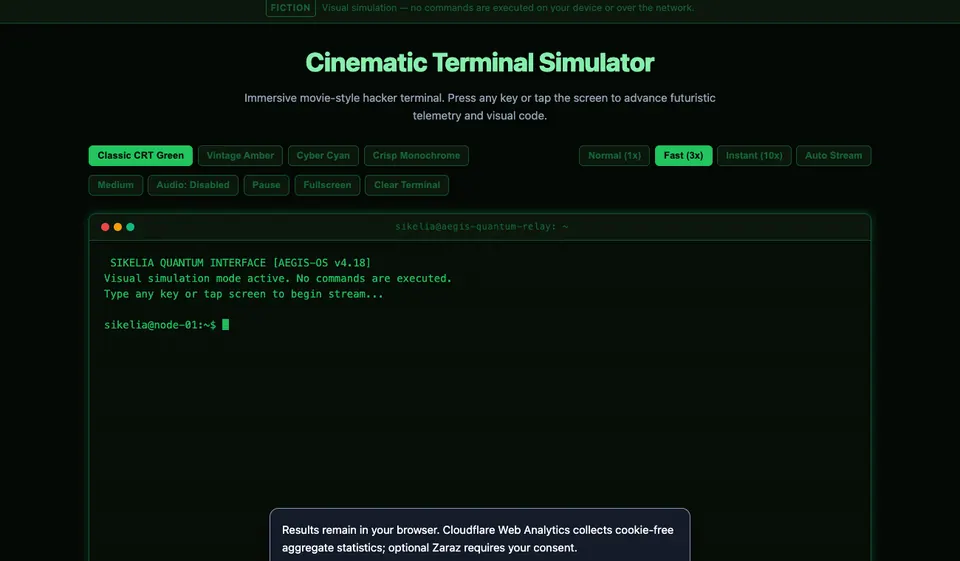
The Sikelia Cinematic Terminal Simulator is a browser-based visual simulation. Its code-like output is fictional, and using it does not execute the displayed commands on your device or on a network.
Start with the purpose of the scene
Before opening a simulator, decide whether your visual is meant to be read or simply seen. In a presentation, an audience may need a clean, legible interface. In a creative video, movement and atmosphere may matter more than the precise words on screen.
A fictional terminal is appropriate for those visual goals. It is not a replacement for a real shell, command-line tutorial or development environment.
How to create the terminal effect
- Open the English cinematic terminal.
- Read the notice that the screen is a visual simulation rather than a working command-line tool.
- Follow the on-screen instruction to use a keyboard key or tap the screen to animate the scene.
- Explore the available visual themes and display controls to match the setting of your video or demonstration.
- If it improves the composition, use the full-screen presentation option. Review any sound settings before recording.
Keep the screen contents contextual: do not present fictional output as evidence that a real server, account or system has been accessed.
Make the result easier to film
Set your capture resolution and screen orientation before recording. Leave enough space around text so it remains legible after the footage is cropped or reduced in a mobile video. If you use sound, preview it at the intended playback volume. You can also choose a quieter presentation if audio would distract from narration.
A short, focused terminal sequence often communicates the idea more clearly than an endlessly scrolling wall of simulated text.
What this tool does not do
The simulator does not run actual shell commands. It does not connect to a computer you are operating, inspect files or provide development results. If you need to write or test code, use a real coding environment instead.
Try a scene: Open Cinematic Terminal Simulator in English.
Open the tools mentioned in this guide